
Moving from WhatsApp and email
Most firms collect documents on WhatsApp and email today. It works, until you need to find one file, or a staff member leaves with half your Clients' papers on their phone. This guide moves you over in a week, without confusing anyone.
Time: about 4 minutes to read. One week to switch.
What changes
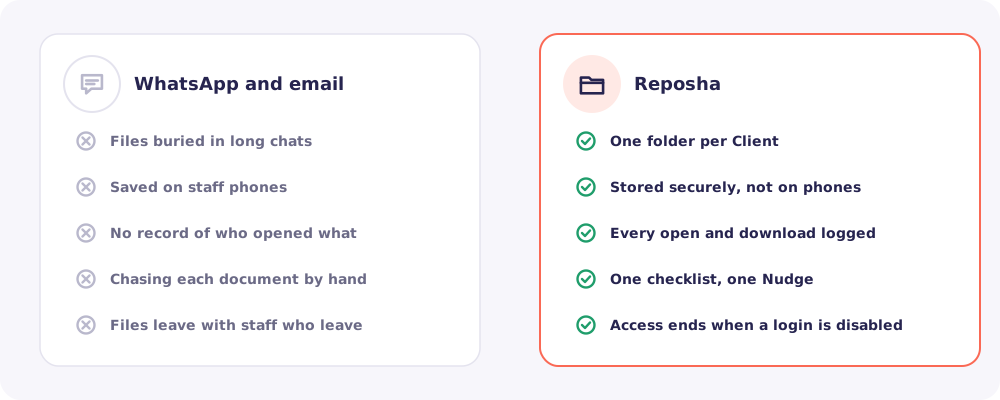
You still use WhatsApp. It just carries the link instead of the files. The files themselves go straight into each Client's folder.
The plan
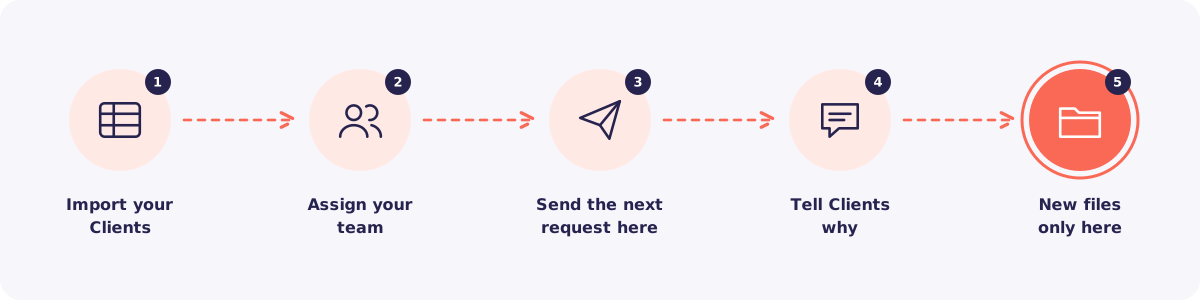
Step 1. Import your Clients
Export your Client list from Excel or your contacts. Then import it in one go from Clients → Import Clients.
Step 2. Assign your team
Give each Staff member the Clients they handle. From then on, each person sees only their own list.
Step 3. Send the next request on Reposha
Don't move old files. Start fresh with the next thing you need, such as this year's ITR documents. Send that request from Reposha, with a checklist.
Step 4. Tell your Clients why
Clients follow a new routine faster when they know the reason. Send this message once, before or with the first request.
Namaste! From now on we will collect your documents through a secure link instead of WhatsApp. Your papers go straight into your own private folder, and only our assigned team can open them. Every time someone opens a file, it is recorded. You will get a link and a 6-digit code from us. Just tap, enter the code and upload. No app, no password.
Edit it to match your voice. You can also share the guide How to upload your documents with them.
Step 5. New files only on Reposha
From now on, when a Client sends a document on WhatsApp, reply kindly with their upload link. After a week or two, they won't need reminding.
Quick answers
What about the files already on WhatsApp? Leave them where they are. Reposha starts from today. Within a season, everything you need will be in Reposha.
What if a Client is not comfortable with links? The upload page works on any phone browser, in English and Hindi. It shows simple steps before they start. Most Clients finish in under two minutes.
Does Reposha send WhatsApp messages for me? No. Every message opens in your own WhatsApp, ready to send. Your Clients always hear from you, not from a stranger's number.