
Send one request to many Clients
ITR season means the same documents from fifty Clients. You don't need fifty requests. Create one, tick everyone, and Reposha does the rest.
You will need: the Clients added in Reposha.
Time: about 5 minutes for 50 Clients.
At a glance
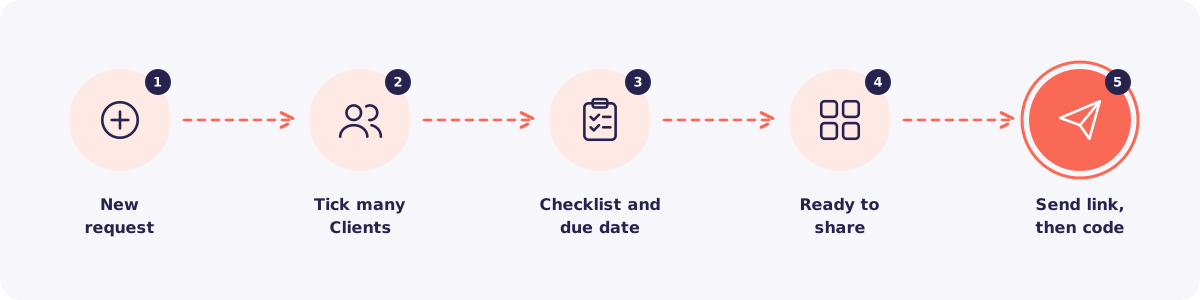
Step 1. Start a new request
Go to Requests and click + New request.
Step 2. Tick many Clients
Search and tick every Client who needs the same documents.
Tip: Tags make this fast. If your salaried Clients carry the tag "Salaried", search for it and tick them all.
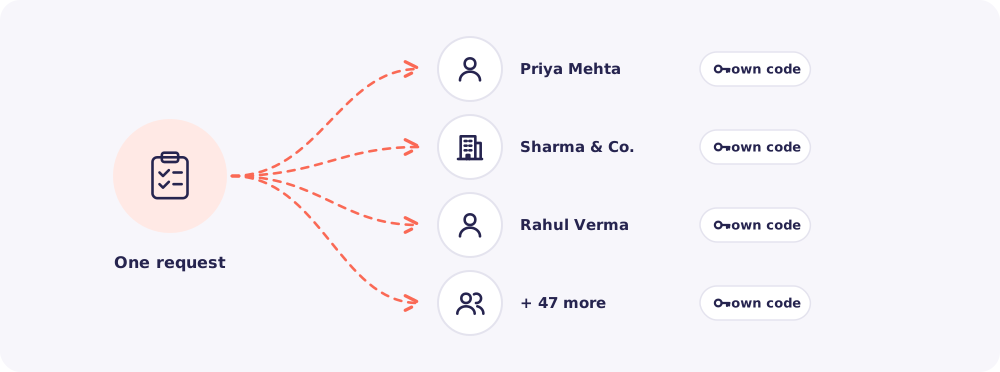
Each Client still gets their own request, their own link and their own access code. Nobody sees anyone else's list or files.
Step 3. Pick the checklist and due date
Choose a checklist and adjust the items. Then set one due date and an optional note. They apply to every Client you ticked.
Click Create request.
Step 4. Open Ready to share
Reposha shows Ready to share, with one row for each Client.
Step 5. Send each link and code on WhatsApp
Work down the list, one row at a time.
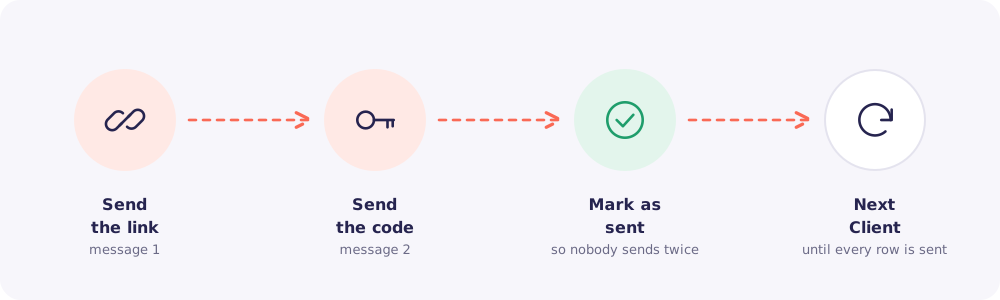
- Click Send link on WhatsApp. WhatsApp opens with that Client's link. Send it.
- Click Send code on WhatsApp. Send the code as a second message.
- Back in Reposha, click Mark as sent.
Mark as sent keeps track for you. If you stop halfway, you know exactly where to start again. It also tells your team who has already been contacted.
Quick answers
Can Staff send a request to many Clients? Yes, but only to the Clients assigned to them.
Does Reposha send the WhatsApp messages by itself? No. Each message opens in your own WhatsApp, so your Clients hear from you. Reposha never messages them on its own.
Will the requests be tracked separately? Yes. Each Client's request has its own progress, its own Nudge and its own place in the Requests list.