
Import Clients from a spreadsheet
Already have your Clients in Excel or your accounting software? Import them all at once instead of typing each one.
You will need: your Client list in Excel or Google Sheets.
Time: about 5 minutes, plus the time to tidy your list.
At a glance

Step 1. Download the template
Go to Clients and click Import Clients. Then download the template file.
The template shows the exact columns Reposha expects, with an example row.
Step 2. Fill in your Clients
Open the template in Excel or Google Sheets. Copy your Clients into the columns, one Client per row.
Keep these tips in mind:
- Enter mobile numbers as 10 digits, without spaces.
- Leave optional columns empty if you don't have the details.
- Don't change the column headings.
Then save the file as CSV.
Step 3. Upload the CSV file
Back in Reposha, upload your CSV file.
Step 4. Check the preview
Reposha checks every row before anything is added. Then it shows you a preview.
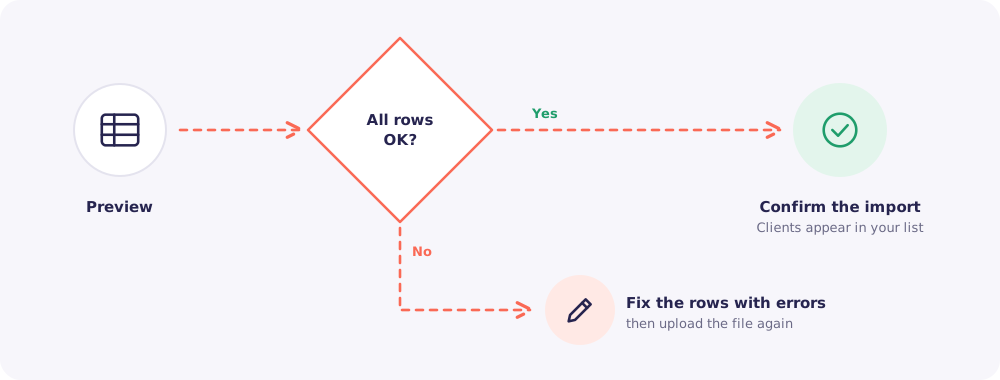
If some rows have errors, such as a missing name or a wrong mobile number, fix them in your spreadsheet. Then upload the file again.
Step 5. Confirm the import
Click to confirm. Your Clients appear in your list, each with their own folder and upload link.
Next: Assign the new Clients to your team, so Staff can see them.
Quick answers
I have more Clients than my plan allows. The import adds Clients only up to your plan's limit. The Owner can move to a bigger plan first, then import.
Can I import the same file twice by mistake? Check your Client list first. If you see duplicates, delete the extra copies.
Who can import? The Owner and Managers.