
Client lost the code or the link
Clients lose messages, share codes and type them wrong. Each of these has a quick fix. Find your Client's situation below.
Time: about a minute per fix.
Four snags, four fixes
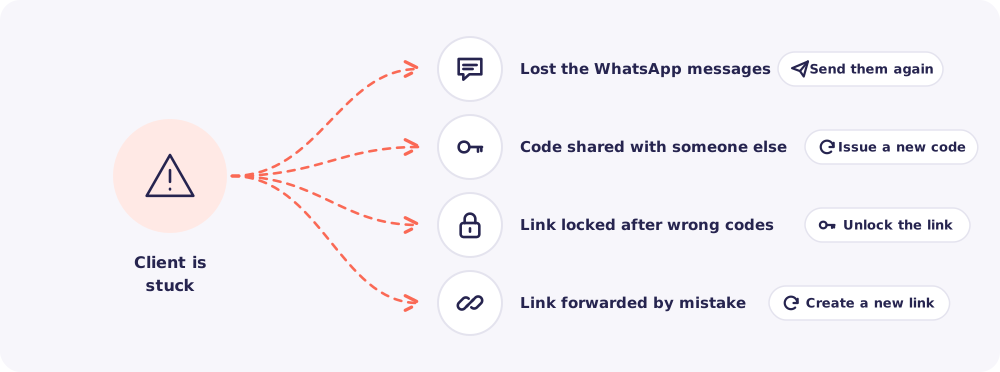
1. They lost the WhatsApp messages
Open the request. The access code is shown there. Send the link again, then the code as a second message.
If only the code is lost, send just the code. If they still have the code, a Nudge brings back the link with the documents still missing.
2. The code was shared with someone else
Issue a new code. The old one stops working at once.
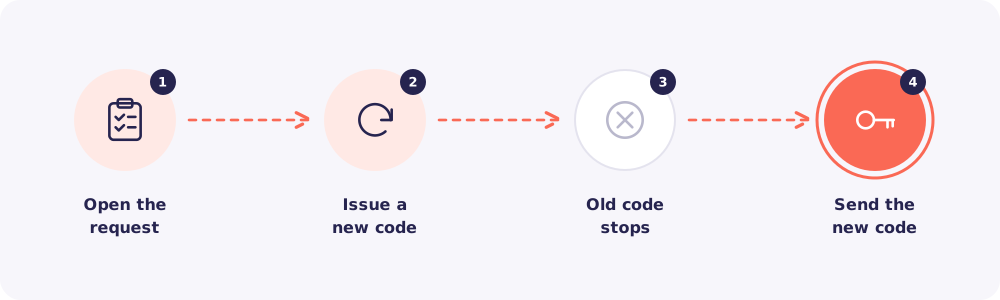
- Open the request.
- Find Access code and issue a new one.
- Send the new code to your Client on WhatsApp, as its own message.
3. The link is locked after wrong codes
To keep folders safe, the link pauses itself for 15 minutes after 5 wrong codes. After 20 wrong codes in a day, it locks until someone on your team unlocks it. Your assigned team gets a notification when this happens.
First, check with your Client that it was really them. Then open the Client's page, go to Upload link and unlock it.
4. The link was forwarded by mistake
A forwarded link alone can't open anything. It still needs a current code. But if you want to be fully safe, create a new link.
Open the Client's page, go to Upload link and create a new link. The old link stops working. Then send the new link to your Client, followed by the code in a second message.
Good to know: Issuing codes and managing links is for the Owner and Managers. Staff can ask them to do it.
Quick answers
My Client typed the right code but it says wrong. They may be using an old message. Ask them to use the most recent one. Or issue a new code.
Can a Client see files they uploaded before? No. The upload page lets Clients add files, never view them. So a lost link never exposes anything.