
Log in with a login code
A login code is a second lock on your account. Even if someone learns your password, they still need the code that lands in your inbox. Reposha sends it by email only, never by SMS.
You will need: access to your email.
Time: under a minute, once you're used to it.
At a glance
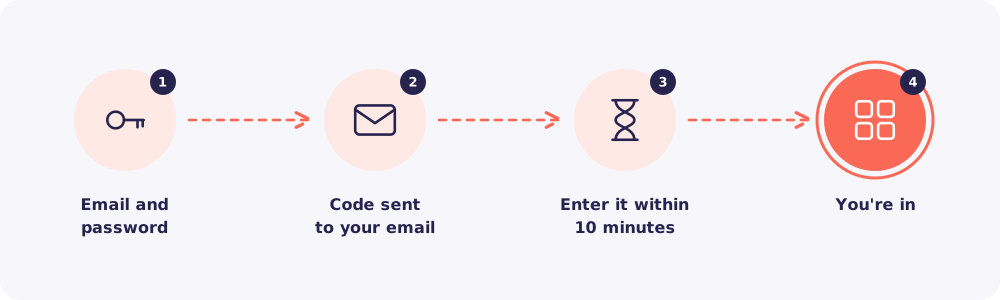
Step 1. Enter your email and password
Go to app.reposha.com and log in as usual.
Step 2. Check your email
Reposha sends a 6-digit code to your email address. It usually arrives within seconds.
Step 3. Enter the code within 10 minutes
Type the code on the login screen. It works for 10 minutes.
Before you continue, tick Trust this browser if this is your own computer. Then you won't be asked for a code on this browser for 30 days.
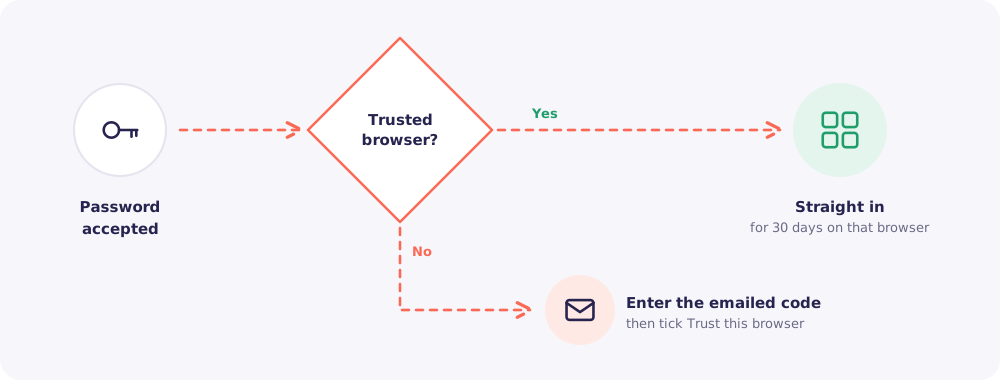
Don't trust shared computers. Leave the box unticked on an office computer that others use.
Step 4. You're in
Your dashboard opens. That's it.
Who gets asked for a code
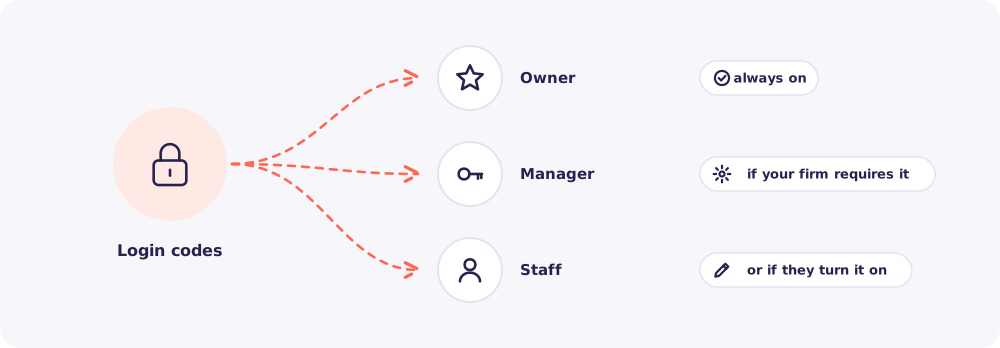
- The Owner always gets a code. It can't be turned off, because the Owner can do everything.
- Managers and Staff get one if your firm requires it for everyone, or if they turn it on in My account.
Quick answers
The code didn't arrive. Check your spam folder first. If it is in Spam, move it to your inbox. Then ask for a new code on the same screen with Get a new code. Always use the newest one.
I typed the wrong code a few times. Each code allows 5 tries, and the screen shows how many are left. After that, it stops working. Ask for a new code and use that one.
Why was I logged out? Reposha signs you out after 30 minutes without activity, and after 12 hours in any case. This keeps Client files safe on a desk you've walked away from.