
How to Import a Client's Old Records into Reposha
When you add a Client, you can bring in the records you already hold for them. Imported files sit in the Client's folder next to anything the Client uploads, but they are always labelled Firm import, so you can tell them apart.
You will need: a Client folder, and the files on your computer (PDF, Word, Excel, CSV, JPG or PNG, up to 25 MB each).
Time: about a minute.
Who can import
- Owner and Manager: yes.
- Staff: never, on any Client.
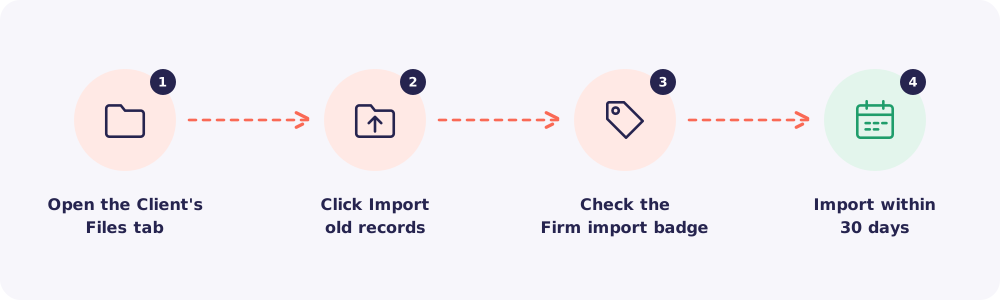
Step 1. Open the Client's Files tab
Click Clients, open the Client, then open the Files tab.
Step 2. Click Import old records
Choose your files, or drag them onto the panel. You can pick many files at once. Folders cannot be imported, so add files only.
The same rules apply as for Client uploads: the same file types and the same 25 MB limit for each file. Imported files count towards your account's storage.
Step 3. Check the Firm import badge
Each imported file shows a Firm import badge. Hover over it to see who imported the file and when, and a reminder that the Client did not upload it.
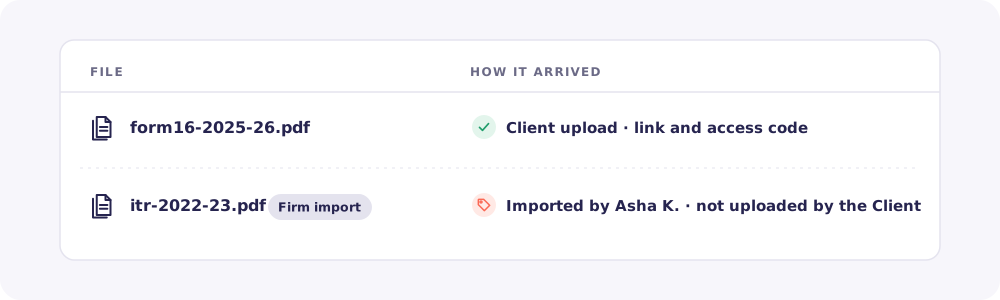
Use the filter on the Files tab to show All files, Client uploads only or Firm imports only.
Step 4. Know the 30-day window
Import is open for 30 days from the day you add the Client. After that the button disappears.
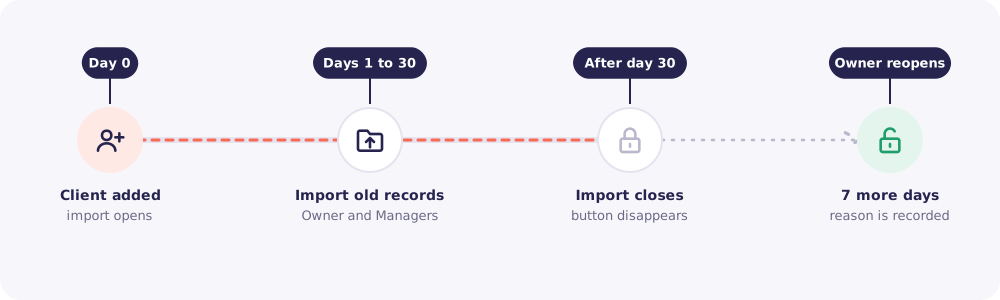
The Owner (only the Owner) can open it again. Click Reopen import, write a short reason (up to 300 characters) and confirm. Import then stays open for 7 days, for the Owner and Managers. The reason, the date and the Owner's name show on the Files tab.
Quick answers
Is an imported file proof that the Client sent it? No. Only files the Client uploads through their own link and access code show that. Imported files are always marked as your firm's import.
Should I use this for new documents? No. New files should come through the Client's upload link.
Can I import a whole folder, or for many Clients at once? No. Import is one Client at a time, file by file.
How long are imported files kept? For the same retention period as the Client's other files, counted from the import.