
Handle a Client's deletion request
Under India's data protection law, people can ask for their personal data to be deleted. Reposha gives your Clients a simple way to ask, and gives you a clear record of your answer.
Who can do this: the Owner and Managers.
Time: about 3 minutes per request.
The 30-day timer
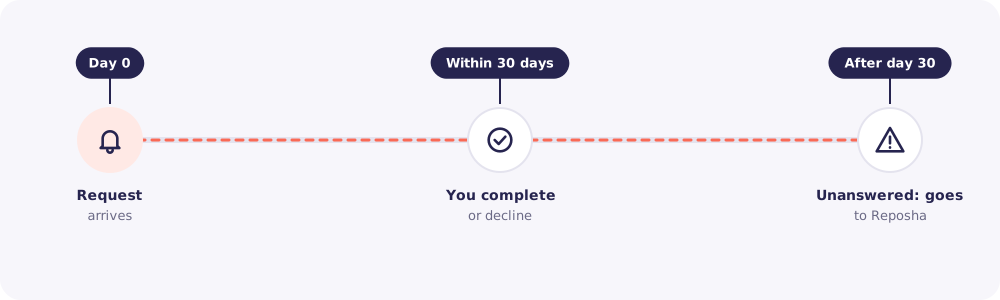
When a Client asks, you get a notification and an email. The request shows a 30-day timer. Answer before it runs out. If you don't, the request is passed to Reposha to follow up with you.
At a glance
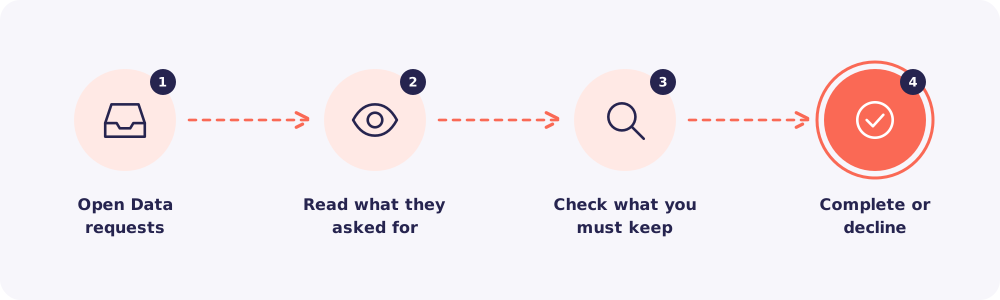
Step 1. Open Data requests
Click Data requests in the left menu.
Step 2. Read what they asked for
Open the request. It shows what the Client wants deleted, their reason and how to contact them.
Step 3. Check what you must keep
Some records you may need to keep by law, for example under tax rules. Check before you decide.
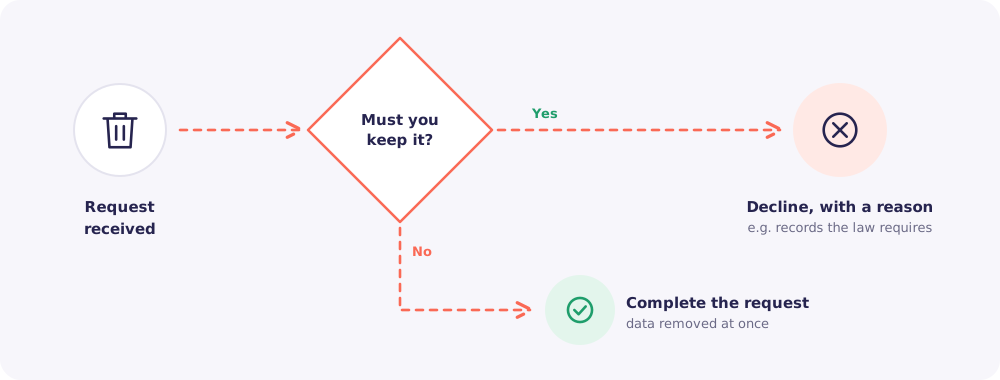
Step 4. Complete or decline
- Complete: Reposha removes the data at once.
- Decline: write a clear reason. For example, "We must keep your tax records for the period the law requires."
The Client can check the status of their request at any time from their link: received, in review, completed or declined.
Good to know: Your decision, with your name and the time, is recorded in the Activity log.
Quick answers
A Client asked me by phone instead. You can delete their data yourself. See Delete and restore a Client. Ask them to use their link next time, so there's a record of the request.
I need more time to check. Answer within the 30 days. If you need to keep part of the data, decline with a reason that explains what you keep and why.